Desktop guide: Projection, annotations in multiple windows, original-text diagrams
2026-09-14
BiblePro Desktop 2.2.0 brings three major additions: annotations in multiple windows, diagrams for the biblical original text, and Projection. The 4-minute video below demonstrates all three (narration and on-screen subtitles are in Chinese); the written steps that follow cover the same ground.
Video walkthrough
Playback speed:
1.00x
Tap a timecode to jump straight to that chapter:
What is new in this release
Annotations: open in a new window, compare side by side
Original text: open a diagram, inspect words, linked scrolling
Projection: send selected verses to the big screen
Projection: custom slides, templates and groups
Recap
1. Annotations in multiple windows
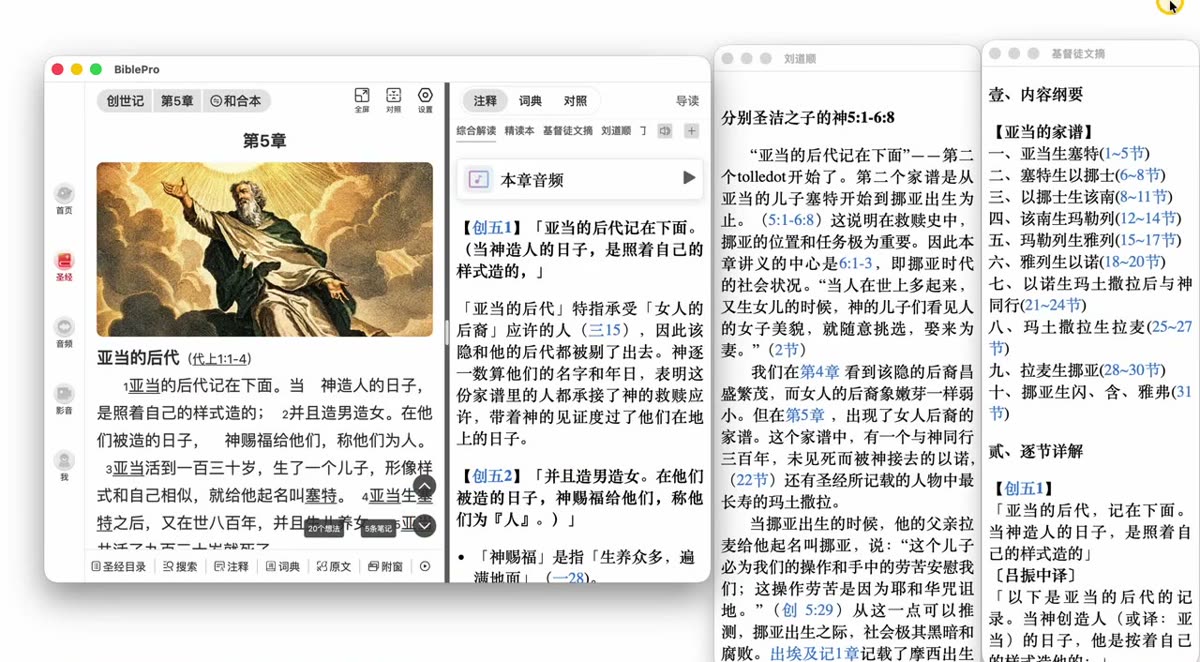
Annotations used to share the main window in a top/bottom split. Now each one can be torn off into its own window, so several commentaries sit side by side.
Open Annotations while reading
Right-click the name of an annotation
Choose Open in new window
Move and resize the new window freely — open as many as you need and keep them all on screen at once
Ideal for a large or dual monitor: Scripture in the main window, with the comprehensive commentary, study edition and other annotations lined up beside it.
2. Diagrams for the original text
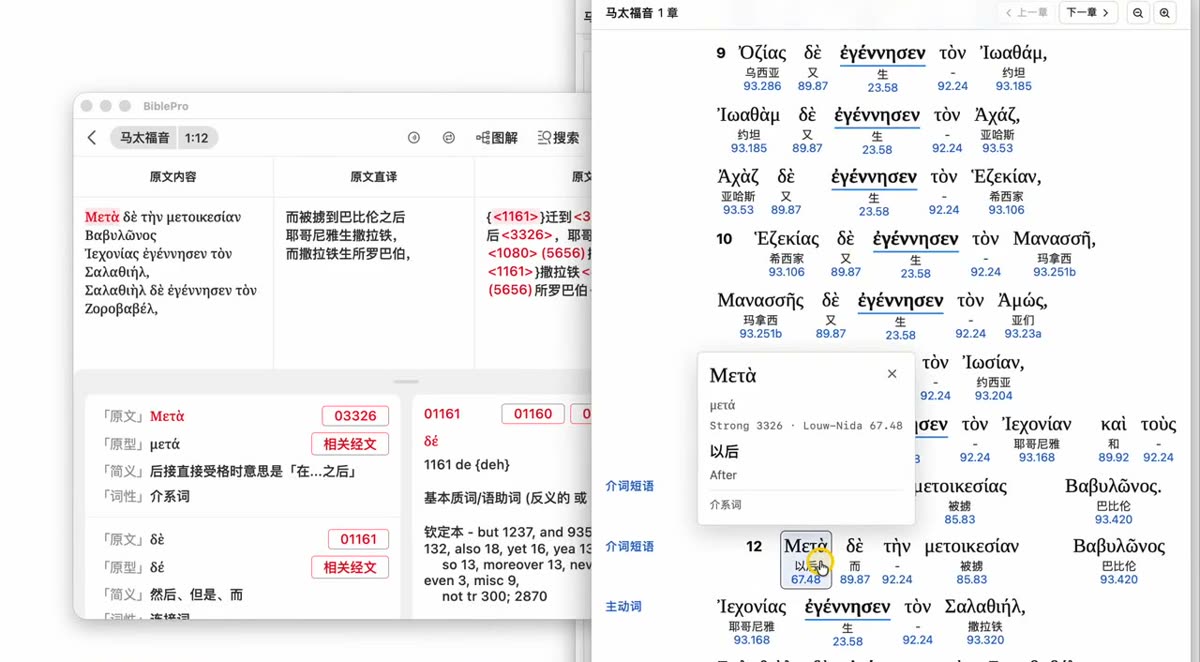
The Original Text module gains a Diagram section that draws the syntax of a verse — main clause, modifiers and parallel structures at a glance.
Open Original Text, then click Diagram at the top
Pick the diagram resource you want from the list and click OK
Once it opens, hover over or click any word to see its details (original form, lemma, gloss, part of speech, Strong’s number and more)
The two panes stay in sync: move to the next verse on the left and the right pane jumps to that verse automatically
You can open several different diagrams at once, and clicking a verse number inside a diagram moves the text on the left to match
Click a word for its gloss and Strong's number; both panes stay in sync
3. Projection
Projection is the headline feature of 2.2.0 — built for meetings, Bible study groups and Sunday worship. It works in two ways: projecting Scripture and building custom slides.
3.1 Projecting Scripture
Choose Projection in the bottom toolbar, or use multi-select in the Catalog
Tick the verses you want, click OK, then click Project
Choose how verses are paginated: one verse per page, or distribute automatically
With one verse per page you get a preview first — check it, then click Done
Pick the window to project onto (second display / projector) and click Start projection
Preview every page before you start; generated pages are listed on the left
3.2 Custom slides
Beyond Scripture, you can build slides for welcomes, prayer items and hymn lyrics.
Open Projection from the bottom toolbar → create a new projection
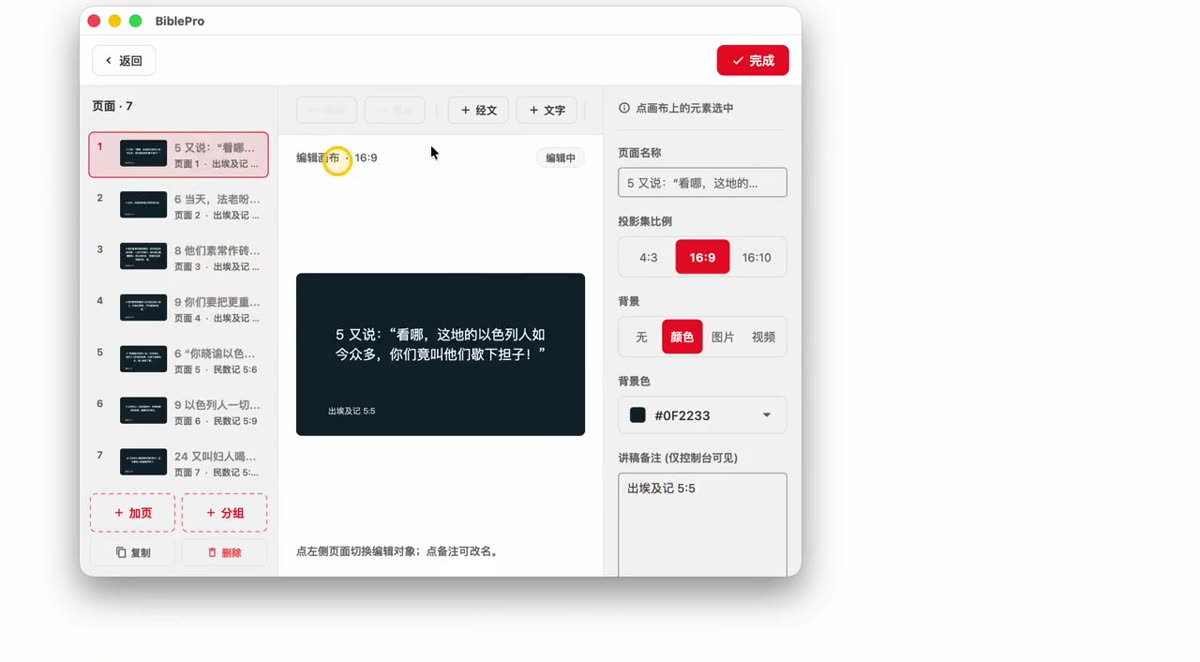
Choose the aspect ratio (4:3 / 16:9 / 16:10), pick a template, then create it
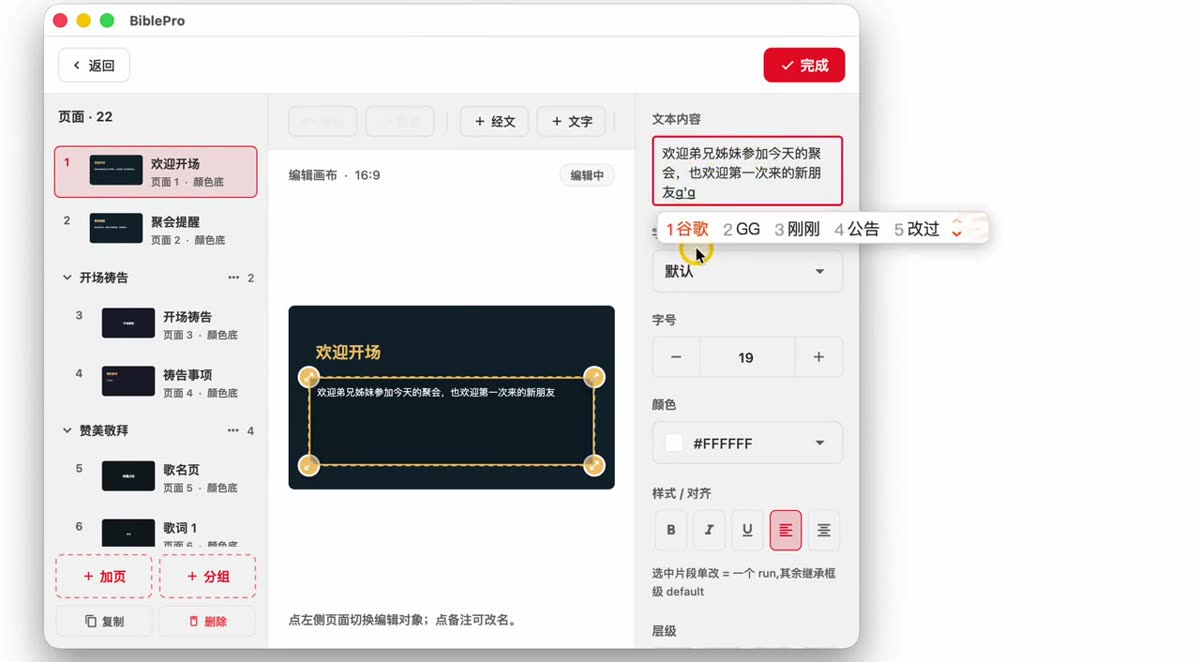
Double-click the content to edit the text; you can also insert + Verse and + Text
Rename a page (for example to “Opening welcome”) so it is easy to find in a long list
Use groups to organise pages (for example “Opening prayer”, “Praise and worship”) and duplicate pages within a group
Set the background to a colour, an image or a video, and add speaker notes (visible only on the control console, never on the projected screen)
When the slides are ready, click Project
Rename, group and duplicate pages; backgrounds can be a colour, image or video
3.3 While projecting
Action
What it does
↑ ↓ or ← →
Previous / next page
ESC
Exit projection
Editing a page
You can keep editing during projection — the projected screen updates automatically
Blackout
Blank the projected screen at any time (handy between segments)
Which version do I need?
These features require Desktop 2.2.0 or later (Windows / macOS). Click Download on the home page for the latest installer; the full list of changes is in the changelog.
v5.0.12
2026-09-22 · Added Bible Catalog search and chapter images, fixed numerous known issues
Added search to the Bible Catalog (quickly find and open passages)
Added chapter images (can be turned on or off under Reading Settings → Advanced Settings)
Fixed numerous known issues and improved overall stability and performance
Desktop v2.2.0
2026-09-09 · Desktop: added Projection, annotations in a separate window, a Diagram section for original texts, and catalog search
Added Projection (accessible from the bottom toolbar and from multi-select in the Bible Catalog)
Annotations can now be opened in a separate window (right-click to open in a new window)
Added a new Diagram section to the Bible Original module
Fonts and font sizes can now be set independently for each Bible version
Added search to the Bible Catalog (quickly find and open passages)
Added chapter images (can be turned on or off under Reading Settings → Advanced Settings)
Added member management and grouping, plus one-time follow QR codes, to the Devotional Channel
Fixed numerous known issues and improved overall stability and performance
v5.0.10
2026-08-12 · Fixed frame drops while reading, annotations now show adjacent verses, added a reading plan widget and calendar reminders, enhanced Devotional Channels
Fixed frame drops and lag when reading the Bible
Annotations now support viewing previous and next verses
Added a Bible reading plan home screen widget
Different Bible versions now support independent font size settings
Added reading plan publishing and member management for Devotional Channels
Added reading settings for Devotional Channel content
Bible reading plans now support calendar reminders
Improved original text layout
Added multi-select support for My Highlights
Fixed known issues and improved performance
v5.0.3
2026-06-10 · New Reflections Circle, improved audio playback, and many fixes
Added Reflections Circle to the Devotional channel; articles now show who has read and who has checked in
Improved the audio playback experience
Fixed incorrect display of commentary sections
Fixed the “Search All” feature issue in the Dictionary
Fixed an issue where audio/video downloaded in older versions failed to display
Fixed an issue where questions and prayers from older versions failed to display
Scripture sharing now supports Dark Mode
Fixed incorrect image colors in Reading Mode
Fixed issues where original text could not be copied, and searching with spaces or underscores failed
Windows: Fixed installation failures on some computers
macOS: Fixed download failures on some computers
Fixed other known issues and improved performance
v5.0.0
2026-05-12 · New reading layout, AI search, word-level notes, and all-new media
Brand-new scripture reading layout, with paragraph display matching printed Bibles
New side-window feature: view more verses and commentary without leaving the passage you are reading
AI semantic search: locate verses with a single natural-language sentence
Word-level verse notes: tap a word to add a note
Aggregated dictionary search: search all downloaded dictionaries at once
All-new media: Bible audio, video, and devotional content fully upgraded, with support for building your own albums
In-depth study: commentary, dictionary, and original text connected in one place
Reading plans: customizable check-in times and visualized progress
Devotional channel: subscribe to the columns you like, and read and check in together with your group
Custom resource import: import your own commentaries, dictionaries, reading plans, and other resources
Custom font import: read the Bible with your favorite fonts
Notes fully upgraded: export to Word / Markdown / HTML
Many performance and stability improvements
v4.0.0
2022-10-12 · Brand-new scripture display, tap words/links, print-book layout
Brand-new scripture display
Tap scripture to view words and links
Support for print-book verse layout (enable stanza and paragraph display)
Page dial to quickly jump to a specific page of a book
New sign-up and login, supporting email and account login and more
Support for online customer service and video help
v3.0.0
2020-04-22 · New parallel view, reading groups, community features, split-screen and pop-up view
New Bible parallel view; parallel view supports looping playback by stanza
Community features: Ideas, questions, prayers
Discover: added an app favorites folder for adding online apps
Table of contents multi-select supports read-aloud (play selected scripture)
Parallel management: quick entry for playback speed settings